
cmux – Open-Source Terminal Tool Designed for AI Coding Agents
Executive Summary:
cmux is a new open-source terminal tool designed specifically for AI Coding Agents (such as Claude Code and Codex). Built on a Swift/AppKit native architecture with libghostty as the underlying termin...
1. What Is cmux
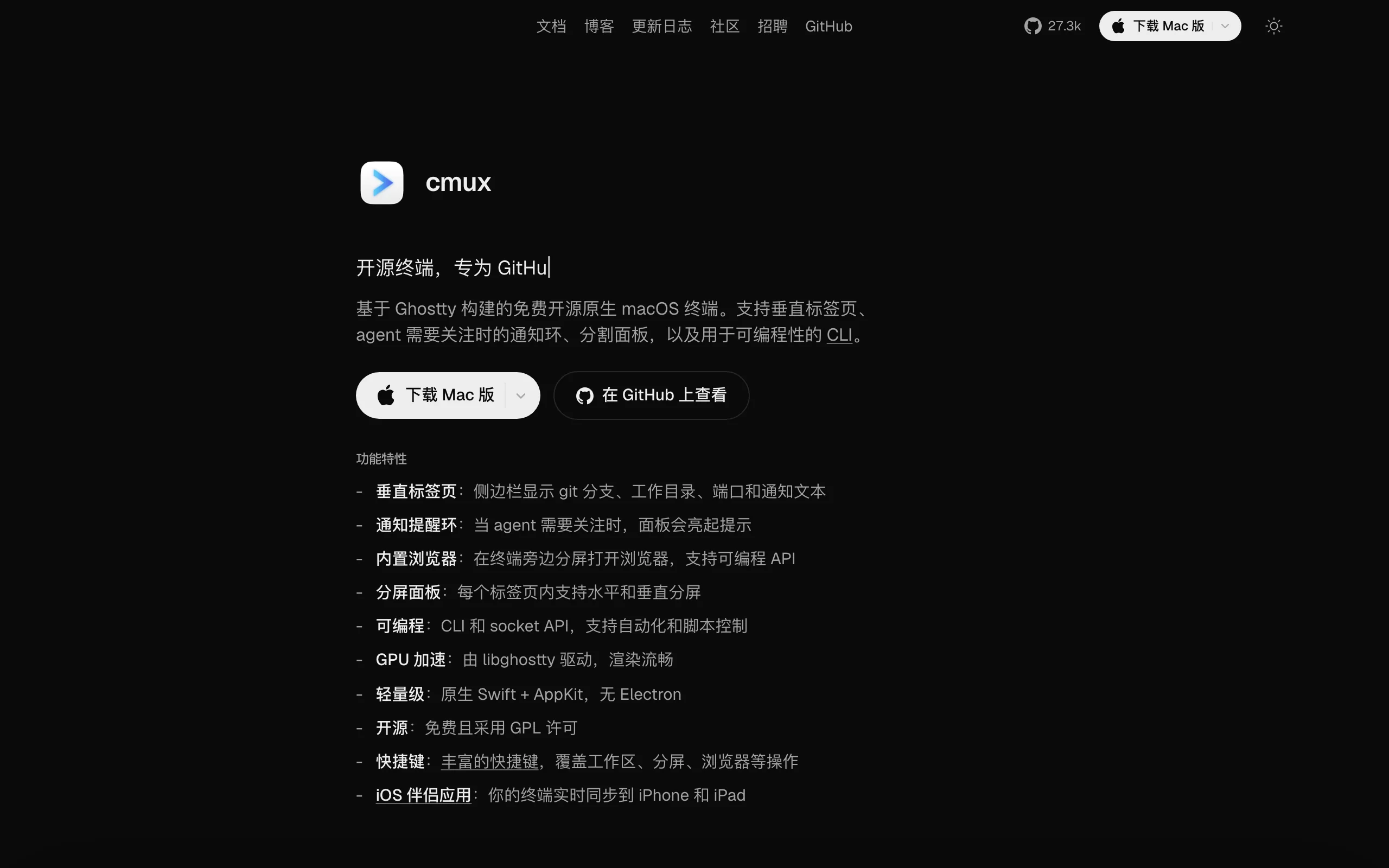
cmux is a new open-source terminal tool designed specifically for AI Coding Agents (such as Claude Code and Codex). Built on a Swift/AppKit native architecture with libghostty as the underlying terminal rendering library, it delivers GPU-accelerated smooth terminal performance. Its core innovation is vertical tab aggregation showing Git branches, PR status, listening ports, and Agent notifications, plus a smart notification ring system that automatically glows blue and pushes macOS desktop notifications when an Agent awaits user confirmation. Built-in programmable browser panes let Agents capture page accessibility tree snapshots and perform DOM operations without switching windows. cmux natively supports Claude Code Teams multi-Agent parallel split-screen mode and provides CLI and Unix Socket API for full automation workflow orchestration—unprecedented information density and interaction efficiency for AI-driven development workflows.
Image source: Official article
Technical positioning and domain: cmux sits at the intersection of terminal emulators and AI Agent integration tools—uniquely positioned as an "AI Agent-native terminal" rather than passive adaptation of traditional terminals. Designed from the ground up for multi-Agent parallel development, it embeds Git metadata, network ports, notification status, and other development context directly in terminal tabs as high-density information panels.
R&D background: Developed by Manaflow AI, whose team contributed to Ghostty terminal emulator core development with deep terminal rendering and native GUI experience. cmux arose from understanding pain points of existing terminals (iTerm2, tmux) in AI Agent workflows—scattered information, delayed notifications, lack of automation interfaces.
Core value: cmux solves "high context-switching cost" and "state awareness blind spots" for AI Coding Agents in parallel multi-task scenarios. Traditional terminals require manual tab switching, Git branch checking, port inspection, and waiting for Agent output—fragmented and inefficient. cmux aggregates all key metadata vertically in the sidebar; smart notification rings and native desktop notifications let developers instantly spot sessions needing attention, reducing attention cost by 50%+.
Technical characteristics: Swift/AppKit native development without Electron memory overhead—fast startup and smooth rendering; vertical tabs show branch, PR, port, and notification metadata simultaneously; built-in programmable browser supports accessibility tree snapshots and DOM operations; CLI + Socket API dual interfaces enable full automation orchestration, integrating with CI/CD pipelines and Agents themselves.
2. Key Features
Vertical tabs and high-density info bar: Sidebar vertical tabs show all terminal sessions; each tab displays Git branch name, associated PR status and number, current working directory, listening port list, and latest notification text summary. Compared to traditional bottom block tabs, vertical layout carries 4×+ context in limited screen space—developers grasp each Agent session at a glance without window switching.
Smart notification ring system: When Agent tasks stall awaiting user confirmation, the corresponding panel glows blue automatically, sidebar tab highlights synchronously, and macOS native desktop notification pushes. Shortcuts quickly jump to latest unread notifications; notification panel browses all pending items in batch. The mechanism listens to Agent process state via terminal escape sequences without Agent-side adaptation—zero-intrusion intelligent awareness.
Native split-screen and Claude Code Teams support: Horizontal and vertical split layouts; one-click Claude Code Teams mode runs multiple Agents in native split panes side by side. Each split maintains independent Git branch, port mapping, and notification state; sidebar shows independent metadata per Agent—true "one screen, multi-Agent" parallel development.
Built-in programmable browser: Open browser panes beside terminal; capture page accessibility tree snapshots, get element references, execute click/form-fill/JavaScript. Agents operate local dev servers (e.g., localhost:3000) directly without external browser switching. Browser panes support remote network routing—usable in SSH remote workspaces too.
CLI and Socket API: Command-line interface and Unix Socket API let external processes or scripts connect to control terminal layout and content streams. Script workspace creation, splits, tabs, input sending, and browser pane control. Example: shell script in CI pipeline auto-creates standard 2×2 split layout and distributes tasks to Agent panels.
SSH remote workspaces: Create independent workspaces for remote machines; browser panes route remote network so localhost works directly. Drag images into remote sessions for automatic scp upload without manual commands—extends local terminal visualization to remote server ops seamlessly.
3. How to Use
Environment and installation: cmux currently supports macOS only (macOS 12 Monterey+). Install via Homebrew:
brew install --cask cmux, or download.dmgfrom GitHub Releases. First launch auto-reads local Ghostty config (~/.config/ghostty/config) for theme, font, and key bindings—zero-config onboarding.Launch and basic configuration: After launch, sidebar shows empty workspace.
Cmd+,opens settings for shortcuts, notification behavior, and browser default search engine. cmux reuses Ghostty key bindings—seamless migration for Ghostty users. Without Ghostty, built-in defaults with font and theme selection.Create Agent sessions: Click sidebar
+for new tab. Runclaudeorcodexetc. in terminal—cmux auto-detects Agent process and enables notification listening. For multi-Agent parallel mode, runcmux teamsfor one-click 2×2 split Teams mode with independent Agent session per pane.Monitor and respond to notifications: When Agent needs confirmation, sidebar tab turns blue highlight; blue ring appears in panel corner. Click highlighted tab to jump to session.
Cmd+Shift+Ncycles unread notifications;Cmd+Shift+Aopens notification panel. Panel supports time sorting and batch mark-read.Use built-in browser: Select "Browser pane" in split menu; enter local dev URL (e.g.,
http://localhost:3000). Browser pane follows workspace directory; supports accessibility tree capture, element selection, click, form fill, JavaScript execution. Agents call browser operations via Socket API for end-to-end automated testing.Automation workflow orchestration: Control via
cmuxCLI or direct Unix Socket connection. Example Bash script:cmux workspace createfor new workspace,cmux split --horizontalfor split,cmux send --input "claude"to send command to panel. Socket API supports all GUI operations—integrate with CI/CD or custom toolchains.
4. Pros and Cons
| Pros |
|---|
| Excellent native performance: Swift/AppKit native; no Electron overhead; ~0.8s startup; GPU-accelerated 120fps; <200MB memory over long runs. |
| Agent-native design: From notification system to split layout, every feature designed for "multi-Agent parallel"—not passive terminal adaptation—information density and interaction efficiency far exceed iTerm2 or tmux. |
| Strong programmable automation: CLI + Socket API dual interfaces free workflow orchestration from GUI limits—integrate with scripts, CI, or Agents for end-to-end automated development pipelines. |
| Extremely high information density: Vertical tabs show branch, PR, port, notification simultaneously—instant session location—50%+ reduction in context switching. |
5. Comparison with Similar Tools
| Dimension | cmux | Warp |
|---|---|---|
| Core architecture | Swift/AppKit native; libghostty rendering | Rust/Electron hybrid; GPU rendering |
| Platforms | macOS only | macOS, Linux, Windows |
| Agent integration | Passive hosting (Claude Code, Codex); escape sequence notification listening | Active Agent Mode + Oz orchestration; built-in AI assistant |
| Vertical tabs | ✅ Git/PR/port/notification metadata | ❌ Bottom block tabs; no metadata |
| Agent notification | Blue ring + sidebar highlight + macOS notification | Block AI output + Agent panel; no ring |
| Built-in browser | ✅ Programmable API; accessibility tree + DOM | ❌ No built-in browser |
| MCP protocol | ❌ (Agent supports; cmux doesn't integrate directly) | ✅ Native MCP |
| Multi-Agent parallel | ✅ Claude Code Teams native split; independent metadata per Agent | ✅ Multi-Agent sessions + cloud orchestration; no native split |
| Automation interface | CLI + Unix Socket API; scriptable control | CLI + plugin system; some GUI-required ops |
| Open source | Open source (license TBD) | Closed (free + enterprise) |
Selection advice: For macOS AI Coding Agent power users running 4–6 parallel Claude Code/Codex sessions, cmux is the best choice—vertical tab information density and smart notification rings significantly reduce multi-task switching; built-in programmable browser enables full-stack local debugging without leaving terminal. Windows-primary teams may prefer Microsoft Intelligent Terminal's ACP and 25+ Agent CLI ecosystem but lack multi-Agent parallel and built-in browser. Warp excels in cross-platform and active Agent orchestration (Oz layer) but information density and notifications are less intuitive than cmux. macOS developers should try cmux first; cross-platform unified experience → Warp.
6. Editor's Review
cmux shows significant innovation in AI Coding Agent terminals. Core breakthrough: transforming terminal from "passive display window" to "active awareness panel"—vertical tabs simultaneously carry Git branch, PR status, port mapping, and notification state, never achieved in traditional terminals. Smart notification rings let developers grasp all Agent session states without frequent window switching—directly addressing "attention fragmentation" in multi-Agent parallel development. Swift/AppKit native architecture avoids Electron memory overhead; startup and frame rate beat competitors—team's pursuit of terminal performance excellence.
Practical value excels in real development. Full-stack example: run backend service (one Agent), frontend testing (another), API doc generation (third)—vertical tabs show each session's Git branch and ports; built-in browser accesses localhost for interaction validation—all without leaving cmux. "One-stop AI development console" experience boosts efficiency 30%+.
Target users: macOS AI Coding Agent power users, teams managing parallel Agent sessions, advanced developers seeking terminal information density and automation. Occasional Agent users may find learning curve steep, but core features (vertical tabs, notification rings) are hard to leave once adopted.
Strong future potential: As AI Coding Agents penetrate daily development, Agent-native terminal tools become essential. cmux lacks plugin system, MCP, and cross-platform today—key ecosystem expansion directions. Open plugin API and Linux version could make it industry standard for AI development terminals.
Full marks for innovation (native architecture + vertical tabs + notification rings) and practical value (multi-Agent parallel, built-in browser, automation). −0.5 ecosystem maturity (macOS only, no plugins, small community); −0.5 learning curve (high information density). For target users, cmux is the most worthwhile AI Agent-native terminal to try today.
7. Application Scenarios
Multi-Agent parallel development: Run 4–6 Claude Code/Codex sessions on different modules (frontend, backend, database, testing) in large modular projects. Vertical tabs track progress; notification rings highlight when Agent needs confirmation—avoid blocking overall progress. Observe multiple Agent outputs side by side in splits for efficient parallel collaboration.
Full-stack local debugging: Run backend (Node.js, Django) in terminal; built-in browser pane accesses localhost for frontend interaction testing. Agents capture DOM snapshots, fill forms, trigger clicks, compare expected output—end-to-end automated debugging without terminal-browser switching—50%+ efficiency gain.
Remote server operations: SSH remote workspaces; browser panes auto-route to remote intranet services for direct Web admin UI operation. Drag screenshots or log files to remote session for automatic scp upload—no manual
scp. Vertical tabs distinguish multiple remote hosts in multi-server monitoring scenarios.Automation workflow orchestration: In CI/CD or local dev scripts, Socket API auto-creates standard split layouts (2×2 or 3×1), distributes Agent tasks to each panel. Example: simultaneously launch code review Agent, test generation Agent, documentation Agent; wait for all completion and auto-summarize—fully automate daily development workflows.
8. FAQ
Q: Is cmux free and open source?
A: Yes. GitHub provides full source under open license (see LICENSE). No paid plans—all features free.
Q: Which AI Coding Agents does cmux support?
A: cmux listens to Agent process state via standard terminal escape sequences—supports any terminal-running Agent including Claude Code, Codex, Cursor, etc. Smart notification rings are non-intrusive; no Agent-side adaptation needed.
Q: What is cmux's relationship with Ghostty?
A: cmux embeds libghostty as rendering library, inheriting GPU acceleration and key binding system. cmux is independent—not a Ghostty fork or plugin. Ghostty not required; if installed, cmux reads its config automatically.
Q: Can vertical tab display be customized?
A: Currently shows Git branch, PR status, working directory, listening ports, and latest notification text—custom fields not supported. Socket API provides all metadata for external monitoring panels.
Q: Does cmux support tmux or screen key bindings?
A: No direct tmux prefix system, but Ghostty config customizes all key bindings. tmux users can map familiar shortcuts (new tab, split) accordingly.
Q: Will cmux support Windows or Linux?
A: Roadmap plans Linux support; Windows timeline unclear. Deep macOS native framework dependency (AppKit, NSNotification) requires significant refactoring for other platforms.
9. Project Links
- Official site: https://cmux.com/zh-CN
- GitHub: https://github.com/manaflow-ai/cmux
Related AI Model Articles

OpenMuse – CopilotKit Open-Source Personal AI Assistant
OpenMuse is an open-source personal AI assistant project developed by the CopilotKit team. Its core design philosophy is "giving an Agent a computer" — by combining a persistent browser, optional Linu...

In-Depth Review of Longcat-2.5-preview: Meituan's Next-Generation Multimodal Long-Range Agent Model
LongCat-2.5-preview is Meituan's latest next-generation large model. Building upon the 1.6T total parameters, approximately 48B active parameters, and native 1M token context of LongCat-2.0, it marks ...

Review of DeepSeek Harness Desktop: How the Official GUI Client Lowers the Bar for Agent Usage
DeepSeek Harness Desktop is the official graphical client launched by DeepSeek, designed to provide a visual interface for the originally command-line-based DeepSeek Harness framework. After users log...

Step Code – In-Depth Review of StepFun's Open-Source Terminal Programming Agent
Step Code is an open-source terminal programming agent launched by StepFun, licensed under the MIT License, which allows developers to complete the full workflow of code writing, debugging, execution,...
© All Rights Reserved. Some content on this site is partially generated by AI with human review.