
9Router – Open-Source AI Coding Router Proxy for Smart Model Scheduling
Executive Summary:
9Router is an open-source routing proxy built to optimize AI-assisted coding workflows. A local proxy layer unifies Claude Code, Codex, Cursor, Cline, and similar tools while intelligently scheduling ...
1. What Is 9Router
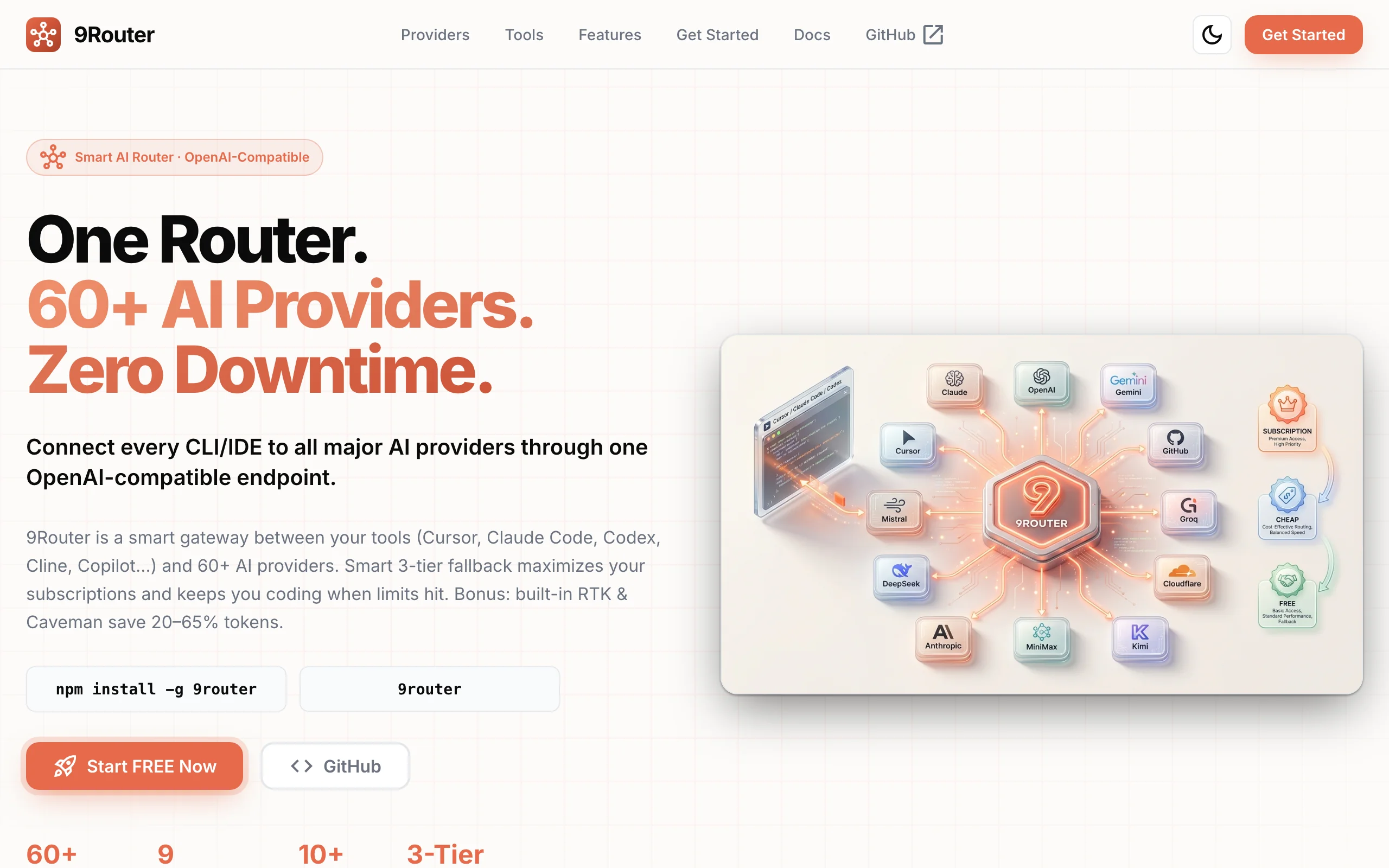
9Router is an open-source routing proxy built to optimize AI-assisted coding workflows. A local proxy layer unifies Claude Code, Codex, Cursor, Cline, and similar tools while intelligently scheduling 100+ models from 40+ providers. Three-tier fallback routing plus a Rust-based RTK token compression engine automatically switches to cheaper or free channels when subscription quotas run out, saving an average of 20–40% on input tokens. A visual dashboard tracks quota usage, cost estimates, and call status so coding stays uninterrupted.
Image source: Official article
Technical positioning and domain: 9Router is AI infrastructure for developer toolchains—“AI coding router proxy.” It does not host models; it middleware-schedules requests across providers, optimizes cost, and handles format compatibility for AI coding scenarios.
Development background: Created and maintained by open-source developer decolua on GitHub. Motivation: fragmented AI coding subscriptions (Claude Pro, Codex Plus, Cursor, etc.) with separate quotas, incompatible formats, and no smart degradation. One local proxy was meant to unify integration and scheduling and cut cost and ops overhead.
Core value: Turns “cost optimization” and “zero-downtime coding” into practice. Automated three-tier fallback means no manual tool switches or waiting for quota resets when paid tiers exhaust—hand off to cheaper or free models seamlessly. RTK compression and “Caveman Mode” can drive monthly AI coding spend near zero—meaningful for indie devs and small teams.
Technical characteristics: Local proxy core with three-tier fallback, RTK pre-filter engine, and format translation middleware. Routing and compression are coupled—lossless compression before format conversion lowers cost while preserving response quality. OAuth auto-renewal keeps subscription channels alive with less manual maintenance.
2. Key Features
Three-tier smart routing: Core scheduler follows subscription quota → low-cost API → free tier. When tier one hits limits, the engine reads error codes and quota state and transparently fails over—no user intervention.
RTK token compression: Rust engine optimized for coding tool output. Before format conversion, RTK scans the first 1KB of
tool_result, matches patterns from git-diff, grep, tree, etc., and losslessly compresses. Tests show 20–40% input token savings.Caveman Mode: Injects concise-style prompts so models reply shorter. Up to ~65% lower output tokens vs standard mode while staying usable—great for high-frequency short interactions.
Unified multi-provider management: OAuth or API keys for 60+ providers (Claude, OpenAI, GLM, MiniMax, Kiro, etc.). One dashboard for config, quota, and health—no platform hopping.
Live quota tracking: Dashboard shows token use, remaining quota, reset countdown, and estimated cost—important for budget-sensitive users.
Automatic format translation: Converts among OpenAI, Claude, Gemini, Cursor, Kiro APIs so any OpenAI-compatible CLI can talk to non-OpenAI backends—foundation of broad compatibility.
Multi-account rotation: Multiple accounts per provider with round-robin and failover when one account limits out or errors.
Request logs and cloud sync: Detailed debug logs for failures and routing anomalies; optional cloud sync of config/logs across devices.
3. How to Use
Install: Node.js v18+ recommended.
npm install -g 9router, then9routerto start the local proxy. Dashboard opens athttp://localhost:20128by default. Usepm2orscreenfor background runs.Connect providers: In the dashboard Providers page, OAuth (Claude, OpenAI, etc.) or paste API keys. Zero-cost users can start with Kiro AI or OpenCode Free. Add 2–3 tiers to maximize fallback.
Create combos: On Combos, stack models by priority—e.g., tier 1
cc/claude-opus-4-7, tier 2glm/glm-5.1, tier 3kr/claude-sonnet-4.5. Each combo gets an API key for CLI config.Configure CLIs: For Claude Code, set API base to
http://localhost:20128/v1and use the combo API key. Same pattern for Codex, Cursor, etc.Code and verify: Use tools normally; when subscription quota dies, traffic falls through automatically. Watch dashboard logs and quota pages; optionally simulate exhaustion once to validate fallback.
4. Pros and Cons
| Pros |
|---|
| Zero-downtime coding: Three-tier auto fallback avoids manual switches and quota wait—strong dev continuity. |
| Meaningful token savings: Rust RTK engine saves ~20–40% input tokens on heavy coding loops. |
| One dashboard for 60+ providers: Central config, quota, and status—less ops toil. |
| Open source with active community: Transparent code, frequent updates, responsive issues. |
5. Comparison with Similar Tools
| Dimension | 9Router | OpenRouter | LiteLLM |
|---|---|---|---|
| Focus | Local router for AI coding CLIs | Cloud unified API gateway | Enterprise LLM proxy / LB |
| Deploy | Local / Docker / VPS / Cloudflare Workers | Cloud SaaS | Local/cloud enterprise |
| Providers | 60+ (OAuth subs + API keys + free tier) | 200+ models | 100+ models/providers |
| Coding CLI fit | Deep fit for Claude Code, Codex, Cursor | Generic API; manual CLI wiring | Generic SDK/proxy |
| Token compression | Built-in RTK (~20–40% savings) | None built-in | None built-in |
| Tiered fallback | Sub → cheap → free, seamless | Fallback without layered strategy | Fallback + retry policies |
| Quota UI | Live dashboard + reset timers | Basic usage stats | Enterprise monitoring |
| Cost angle | Built for indie cost control | Pay-as-you-go; no free-tier aggregation | Enterprise budget/rate limits |
| License | Open source | Partially open | MIT |
Selection advice: Indie devs and small teams on Claude Code/Codex/Cursor benefit most from 9Router's tiered fallback and compression with local privacy. Need 200+ models and pure SaaS? OpenRouter—but no built-in compression or layered fallback. Enterprise teams may prefer LiteLLM for LB, rate limits, and alerts. Local-only models → LocalAI.
6. Editor's Review
9Router nails an under-served niche: multi-provider scheduling and cost control for AI coding. Technically, coupling three-tier routing with RTK compression in one proxy pipeline (“compress then route”) is sharper than treating them as separate modules; Rust keeps compression fast under load.
Practically, it kills “quota anxiety” and runaway spend—indies can save hundreds to thousands per year. The local proxy is also a SPOF—run under Docker/PM2 and backup configs.
Audience: indie devs, OSS contributors, small teams—not enterprises needing RBAC/audit yet. Future wins: custom rule engine, richer RTK filters, team features.
— Deduct for learning curve and docs; core innovation and utility earn the score. Worth trying if you want cheaper, uninterrupted AI coding.
7. Use Cases
Multi-subscription users: Auto-schedule Claude Pro, Codex Plus, Cursor, etc., without wasting quota or hitting hard stops.
Zero-cost developers: Route only through Kiro AI, OpenCode Free, Vertex free tiers with account rotation.
Deadline sprints: 24/7 coding with fallback to free tiers when paid quotas die.
Token-sensitive repos: RTK shrinks git diff/grep/tree dumps 20–40% during refactors and reviews.
Team / multi-device: Cloud-synced provider config; VPS/Docker for shared team routing policy.
8. FAQ
Q: Does 9Router support Windows?
A: Yes—Node.js v18+ on Windows, macOS, Linux. Use admin terminal if permissions bite.
Q: How do I know RTK compression is working?
A: Logs show RTK compressed: X% with before/after token counts; Stats page shows aggregate savings.
Q: How is fallback priority set?
A: By model order in Combos—typically subscription → cheap API → free. On 429/quota errors, it steps down.
Q: Does 9Router store my code?
A: No—it forwards requests/responses without caching code bodies. Logs hold metadata (tokens, latency, route). Disable logging in settings if desired.
Q: OAuth auto-renewal failed—what now?
A: Re-login in the dashboard; check GitHub Issues for provider changes; temporarily use API keys.
Q: Custom routing rules?
A: Combo ordering only today; conditional routing (latency, cost thresholds) is on the roadmap.
9. Project Links
- Website: https://9router.com/
- GitHub: https://github.com/decolua/9router
Related AI Model Articles

In-Depth Review of Longcat-2.5-preview: Meituan's Next-Generation Multimodal Long-Range Agent Model
LongCat-2.5-preview is Meituan's latest next-generation large model. Building upon the 1.6T total parameters, approximately 48B active parameters, and native 1M token context of LongCat-2.0, it marks ...
In-Depth Review of Spark-ASR-2.0: A New Paradigm in Speech Recognition with Non-Autoregressive Architecture
Spark-ASR-2.0 is the latest generation speech recognition large model launched by iFLYTEK based on its proprietary Spark-Audio speech foundation model. This model continues the non-autoregressive para...

Step Code – In-Depth Review of StepFun's Open-Source Terminal Programming Agent
Step Code is an open-source terminal programming agent launched by StepFun, licensed under the MIT License, which allows developers to complete the full workflow of code writing, debugging, execution,...
Xiaomi MiMo-V2.6 – Xiaomi's Open-Source Multimodal Model Series
Xiaomi MiMo-V2.6 is a series of fully multimodal models released and open-sourced by Xiaomi, comprising two native full-modal models: Pro and Flash. It is centered on large-scale Agentic reinforcement...
© All Rights Reserved. Some content on this site is partially generated by AI with human review.