
Ok Work – Baidu's AI On-the-Go Office Tool
Executive Summary:
Ok Work is Baidu's lightweight AI on-the-go office tool, running in the form of a WeChat Mini Program, targeting students and new professionals, and focusing on fragmented office scenarios. The produc...
1. What is Ok Work
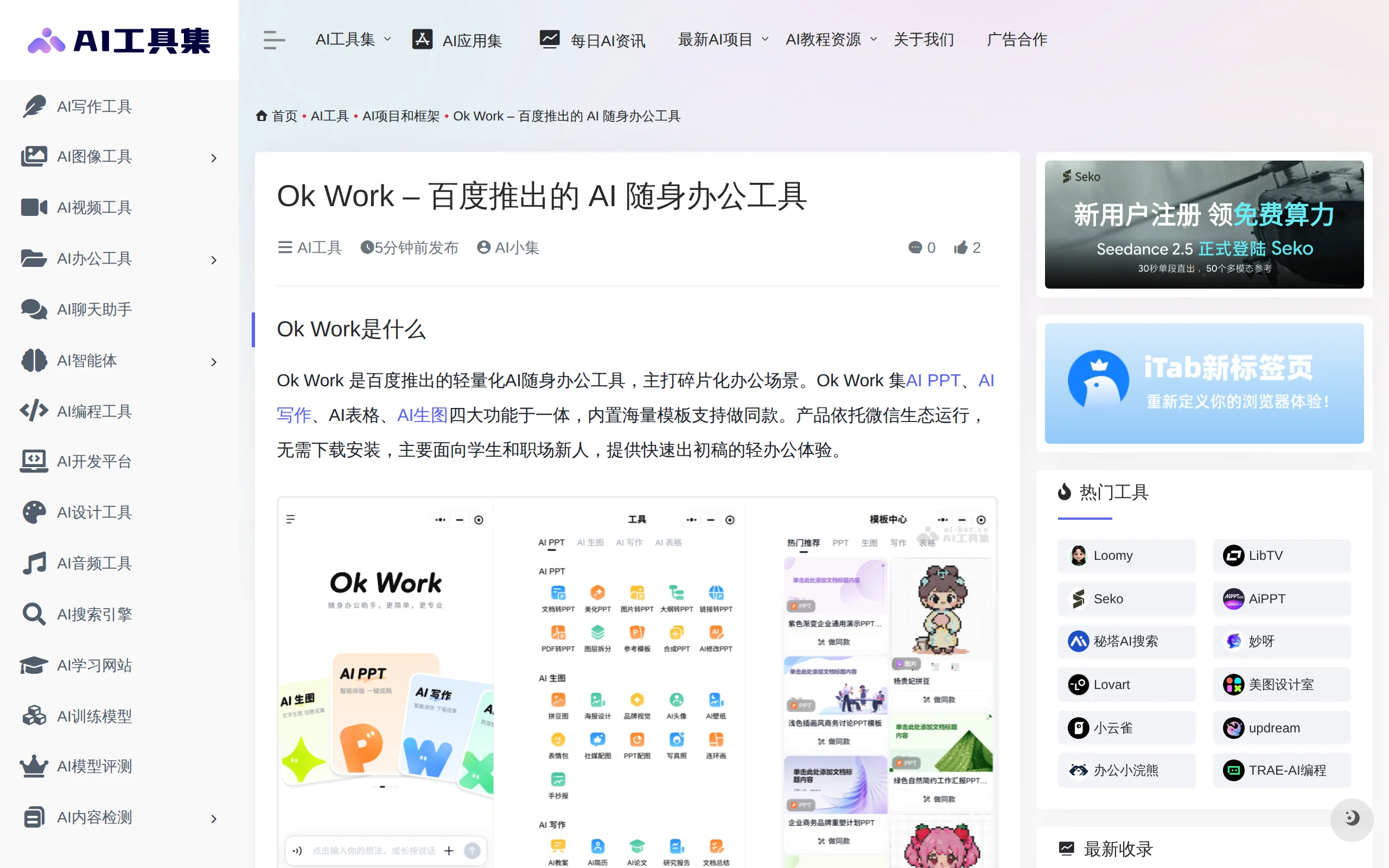
Ok Work is Baidu's lightweight AI on-the-go office tool, running in the form of a WeChat Mini Program, targeting students and new professionals, and focusing on fragmented office scenarios. The product integrates four core capabilities—AI PPT, AI writing, AI spreadsheet, and AI image generation—into a single conversational interface. It comes with a vast library of templates and supports the "Make the Same" feature for quick application, enabling users to complete the entire lightweight office workflow—from content generation, document conversion, to visual design—without the need for download or installation. Built upon the underlying capabilities of the WENXIN large model, Ok Work breaks down complex AI functions into finely-grained specific tools, offering a low barrier to entry for the personal office market and providing a solution for quickly generating initial drafts.
Image source: Official article
Image source: official article
Technical positioning and domain: It belongs to the AI office application domain that intersects natural language processing and computer vision, specifically focusing on conversational content generation and automated document processing. Its uniqueness lies in using WeChat Mini Program as the runtime platform, transforming AI capabilities into service-oriented and tool-oriented functions, emphasizing a lightweight experience of "no installation required, ready to use immediately."
Development background: Developed by Baidu, it is built upon the generative capabilities of the WENXIN large model. Baidu has deep expertise in the AI field, and the WENXIN large model has mature capabilities in multimodal understanding and generation, providing the technical foundation for Ok Work to integrate multiple tasks such as PPT generation, document processing, and image generation. The development motivation was to capture the high-frequency, lightweight AI application needs in personal office scenarios and to align with Baidu's broader mobile ecosystem strategy.
Core value: It addresses practical issues such as high operational barriers in traditional office software, fragmented AI functions, and high costs of template reuse. Ok Work unifies four high-frequency needs—PPT creation, writing, data processing, and image generation—into a conversational interface. Through its template center and "Make the Same" mechanism, it significantly reduces the production threshold, allowing non-professional users to obtain usable drafts within minutes, achieving the lightweight office value of "zero barrier to entry" and "one-stop coverage."
Technical features: It has two major differentiated advantages—fine-grained functional capabilities and broad scenario coverage. The AI capabilities are decomposed into specific tools such as PPT beautification, layer splitting, and PDF to Word conversion, precisely addressing individual pain points. At the same time, it connects multiple task processes through a single conversational entry, achieving a closed loop from content generation, format conversion, to image production.
2. Key Features
AI PPT Generation: Supports two modes: document/PDF import and conversion, and outline generation. Users can upload existing materials or simply provide a topic, and the system will automatically plan the page structure and generate a draft PPT. Combined with a variety of built-in templates, this enables rapid prototyping, ideal for initial setup in scenarios such as weekly reports, performance reviews, and course materials.
PPT Refinement Capabilities: Offers detailed editing tools such as beautification, layer separation, and AI-based modifications. Based on the initial draft, users can adjust the visual style of individual slides, reorganize layered elements, or rewrite content—all without switching to professional design software. This addresses the common pain point of "AI-generated but not visually appealing" content.
AI Writing and Document Processing: Covers one-click generation of various document types, including resumes, lesson plans, research papers, and reports. It also supports document summarization, PDF-to-Word conversion, and content continuation or imitation. This is suitable for scenarios requiring quick text drafts or summarizing long documents, significantly reducing preparation time for written materials.
AI Table and Data Processing: Focuses on data calculation and intelligent table creation, transforming operations such as formula computation and data organization in traditional spreadsheet software into natural language conversations. Users can describe data processing needs in conversational form, and the system will automatically perform the calculations and analysis, reducing the learning curve for table operations.
Template Center and "Create the Same Style": Includes a large number of ready-made PPT and resume templates. After browsing the templates, users can apply the same design with one click and quickly fill in content generated by AI, allowing beginners to produce complete and visually consistent outputs without needing to understand design principles.
3. How to Use
Access the Product: Open the WeChat client and type "Ok Work" into the search bar at the top. Enter the corresponding mini-program from the search results. There's no need to download or install an app, nor to register a separate account—logging in with WeChat authorization is sufficient. This directly reflects the product's zero-barrier characteristic.
Select a Feature Module: After entering the mini-program homepage, you will see four major feature modules: AI PPT, AI Writing, AI Tables, and AI Image Generation. Click the corresponding entry based on the type of task you need to perform. For example, choose the "AI PPT" module when creating presentation materials, or select the "AI Writing" module when drafting a resume.
Input Your Requirements: Describe your specific needs in natural language within the chat input box, or submit relevant files via the upload button. For instance, you might input "Convert this PDF into a PPT" and upload the PDF file, or input "Help me write a resume for a new media operations position" and add keywords related to your personal information. The system will parse the instruction and call the corresponding capabilities to execute the task.
Select a Template (Optional): Visit the template center to browse existing templates for PPTs, resumes, and more. After selecting a style that matches your needs, click "Make a Similar One." These templates are pre-set with overall visual styles and layout structures, and the generated content will automatically be formatted into this style. This is ideal for users unfamiliar with design and layout.
Generate and Refine: After the AI generates a draft, you can add modification suggestions through multiple rounds of conversation, or use AI refinement tools such as editing and beautifying to iterate on specific content. For example, you might specify "There's too much text on the third page—please simplify it" or "Change the color scheme to a blue one." The system will make targeted adjustments accordingly.
Export and Use: Once satisfied with the final result, click the export or save button to store the file locally or in the cloud. Note that some advanced features (such as specific templates or high-frequency generation quotas) require the consumption of AI credits, or may require a membership to access more usage.
4. Pros and Cons Analysis
| Pros |
|---|
| Zero barrier to entry: Operates as a WeChat Mini Program, eliminating the need for installation or independent registration. Users can simply open WeChat to access it, making it extremely user-friendly for non-technical users and shortening the customer acquisition path. |
| Broad functional coverage: Integrates four major modules—PPT, writing, spreadsheets, and image generation—allowing users to complete the entire process from content creation to visual design through a single entry point, making it suitable for a wide range of lightweight tasks. |
| Rich template ecosystem: Comes with a large number of built-in PPT and resume templates, and the "Create the Same Style" mechanism significantly lowers the entry barrier for content creation, enabling even beginners to quickly generate polished, mature layouts. |
| Fine-grained functional design: Breaks down capabilities into small tools such as PPT beautification, layer separation, and PDF to Word conversion, precisely addressing individual pain points with clear and direct usage paths. |
| Wide user and scenario coverage: Covers a variety of scenarios including workplace presentations, student assignments, teaching preparation, and poster design, serving two core user groups—students and new professionals—with broad applicability. |
5. Comparative Analysis with Similar Tools
| Comparison Dimension | Baidu Ok Work | ByteDance Dou+ Work | WPS AI |
|---|---|---|---|
| Product Positioning | Personal lightweight office toolset for fragmented tasks | Enterprise-level AI collaborative office platform | AI-enhanced document office suite |
| Core Features | Four single-point AI tools: PPT, writing, tables, and image generation | Document collaboration, knowledge base, team workflows, etc., for enterprise office scenarios | Document writing, PPT generation, table processing, PDF analysis |
| Runtime Form | Mini program within WeChat, no installation required | Standalone App/PC, requires download and registration | Integrated into WPS client, supports multi-end synchronization |
| Target Users | Students, new professionals, and other users requiring lightweight office tools | Enterprise teams and users with organized office workflows | Existing WPS user base, covering both individuals and enterprises |
| Usage Threshold | Extremely low, directly searchable and usable within WeChat | Higher, requires configuration of workspaces and teams | Moderate, requires installation of the WPS client |
| Collaboration Capabilities | Not supported, focuses on individual rapid drafting | Strong, supports multi-person collaboration and knowledge management | Supports cloud collaboration and sharing |
| Template Ecosystem | Massive PPT and resume templates, supports "create similar" feature | Enterprise scenario templates and approval workflows | Rich library of document and PPT templates |
| Underlying Model | Baidu Wenxin Large Model | ByteDance Dou+ Large Model | Baidu Wenxin + self-developed hybrid architecture |
| Business Model | Membership subscription + AI token consumption | Primarily enterprise subscription-based | Free basic features + premium membership for enhanced features |
| Core Advantages | Fast user acquisition, zero usage threshold, covers learning and work scenarios | Strong collaboration capabilities, suitable for heavy enterprise workflows | Deep integration with office suite, excellent document compatibility |
Selection Recommendations: If the primary use case involves individual rapid drafting and you prioritize the lowest usage threshold and a ready-to-use experience, the WeChat mini program format and "create similar" template mechanism of Ok Work are most suitable, especially for students completing assignments or new professionals creating initial presentation materials. If you are in a team collaboration environment and require shared documents, knowledge base management, or standardized workflows, consider ByteDance Dou+ Work as an enterprise-level collaborative platform, despite its higher setup cost, as the value return for organized office work is more significant.
Additional Considerations: For users heavily reliant on document format compatibility and complex layout features, WPS AI's deep integration with existing office suites is more appealing, allowing seamless connection with current document assets. Meanwhile, users seeking the fastest generation speed and the simplest workflow will find iFlytek SmartDoc's web-based interface more suitable for quickly validating ideas.
6. Editor's Summary
Ok Work's product strategy demonstrates a clear differentiation approach—entering the light office market through WeChat Mini Programs, accurately capturing AI needs in fragmented scenarios among students and new professionals. Its innovation lies in breaking down AI capabilities into highly granular single-point tools, and maximizing template value through a "create the same" mechanism, allowing users without design skills or tool operation experience to quickly produce structurally complete outputs. This design philosophy of "servicizing capabilities" and "dialoguing operations" effectively shortens the learning curve of traditional office software, establishing a shorter connection path between technology and user needs.
From a practical value perspective, Ok Work addresses the issue of generating initial drafts "from nothing," with its four functional modules covering high-frequency needs in office scenarios such as PPT creation, document writing, data processing, and visual design. Its ability to link multiple tasks within a single conversation enables a seamless workflow from content generation to image production, offering real efficiency gains for light office users dealing with fragmented time and diverse tasks. However, the product's lack of collaboration capabilities and complex task handling defines its positioning boundaries—it does not aim to replace full office suites but instead serves as a "first-mile" tool for rapid initiation.
In terms of target users, Ok Work aligns closely with the needs of college students and new professionals. Its template center and fun image generation features also suit students' creative expression scenarios. For medium to heavy office users requiring in-depth data analysis, complex document formatting, or team collaboration, the product's capabilities are currently limited. Looking ahead, if Ok Work continues to expand its template categories, deepen the capabilities of its single-point tools, and gradually explore integration with other Baidu product lines, it has the potential to establish a more solid presence in the light office niche market, becoming an important entry point for Baidu's AI capabilities to reach individual users.
7. Application Scenarios
Workplace Reports and Performance Reviews: Professionals can quickly transfer work summary documents or outlines into the AI PPT module to automatically generate structured weekly, monthly, or performance review PPT drafts. They can then adjust the visual presentation using beautification and layer-splitting features. This process compresses what used to take hours of design and layout work into just a few minutes, making it ideal for high-frequency weekly reports and ad-hoc performance reviews.
Job Application Materials Preparation: Job seekers can generate initial resume drafts using AI writing, then select suitable resume styles from the template center to "create a similar version" and quickly obtain a professionally formatted final product. They can also use the writing feature to refine self-evaluations, project experiences, and other textual content, shortening the preparation cycle during the job hunting season.
Student Assignments and Creative Tasks: Students can use AI-generated collage images, hand-drawn posters, and comic strips to complete creative assignments. They can also use AI writing to draft essays and reports, and leverage the document summarization feature to extract key points from reference materials. This scenario fully utilizes Ok Work's versatility in handling a wide range of academic tasks.
Lesson Planning and Administrative Organization: Teachers can use AI PPT to generate initial course slides and combine it with the lesson plan generation feature to prepare teaching designs. They can also use the AI table's intelligent table creation and data calculation capabilities to organize student grades and track attendance data. The conversational interface reduces the time investment required for administrative tasks.
Simple Visual Content Creation: Operations staff or individual users can quickly create lightweight visual materials such as event posters, social media avatars, and promotional images using AI-generated visuals. For scenarios that do not require professional design software, users can describe their needs in a conversation and directly obtain usable images, shortening the design communication chain.
8. FAQ
Q: Is Ok Work required to be downloaded and installed?
A: No. Ok Work runs as a WeChat Mini Program, and users can simply open it by entering "Ok Work" in the WeChat search bar. There is no need to download a standalone App. However, please note that its functionality is limited to the WeChat Mini Program environment, and there is currently no desktop version available for independent use on computers.
Q: Is Ok Work free to use?
A: Basic features are free to use, but some advanced features require AI credits or a membership to access higher usage limits. Specific quotas and billing rules can be viewed within the Mini Program. Depending on the generation frequency and template selection, the free quota may not be sufficient for high-frequency, in-depth usage.
Q: What input formats does AI PPT support?
A: AI PPT supports importing and converting documents and PDFs. It also allows users to directly input an outline or topic description for generation. After importing a file, the system will automatically parse the content and plan the page structure, upon which users can make fine adjustments.
Q: Can the generated documents or PPTs be exported and edited?
A: Yes. Once satisfied with the generated results, users can export and save the files locally. The exported files can be further opened and edited in professional office software. However, some template styles or layout effects may have minor rendering differences across different software.
Q: Is Ok Work suitable for team collaboration?
A: No. Ok Work is positioned as a personal lightweight office tool and does not support multi-user collaborative editing, team shared spaces, or permission management. If team collaboration is required, it is recommended to use enterprise-level platforms such as DouBao Work, which support real-time document sharing and collaborative editing by multiple users.
Q: Can AI-generated images be used for commercial purposes?
A: This depends on the generated content and the usage scenario. Regularly generated items such as posters and avatars can be used for general promotional and social purposes. However, content involving specific individual portraits, brand elements, or high-degree imitation of existing works may carry potential copyright and compliance risks. It is advisable to confirm the legality of the content source before using it for commercial purposes.
9. Project Links
- Underlying Technology Support: Baidu Wenyi Large Model official page: https://yiyan.baidu.com/
Related AI Model Articles
Jev Search: Open Source AI Search Engine, Achieving Intent Parsing and Multi-Engine Aggregation Based on the Jev Model
Jev Search is an open-source AI search engine frontend developed by the Search1API team. Its core functionality lies in leveraging the Jev structured decision model introduced by the TypeSafe team, en...
WebCraftBench – A Benchmark for AI Web Page Generation Introduced by Tencent in Collaboration with Tsinghua University
WebCraftBench is a benchmark for evaluating the quality of AI-generated web applications, introduced jointly by Tencent HunYuan, Tsinghua University, and Peking University. It aims to address the indu...
Xiaomi-CocktailASR-1: In-Depth Evaluation of a Target Speaker ASR Model Based on an End-to-End LLM Architecture
Xiaomi-CocktailASR-1 is Xiaomi's open-source Target Speaker ASR (TS-ASR) large model, designed using an end-to-end LLM architecture. It uses a reference speech as a speaker embedding prompt to accurat...
Deep Dive into RAG (Retrieval Augmented Generation) for Large Models: From Basic Workflows to Advanced Retrieval Architectures and Optimization
I want to explain RAG (Retrieval Augmented Generation) from the basics to advanced concepts, as it has become one of the most popular solutions for deploying large models in real-world applications. I
© All Rights Reserved. Some content on this site is partially generated by AI with human review.