
Hypit – Open-Source AI Video Generation Tool, Automatically Replicates Viral Videos
Executive Summary:
Hypit is an open-source AI video generation tool, centered on the methodology of "Provide an Agent with a viral video, and it will automatically replicate the entire workflow." It breaks down viral vi...
1. What is Hypit
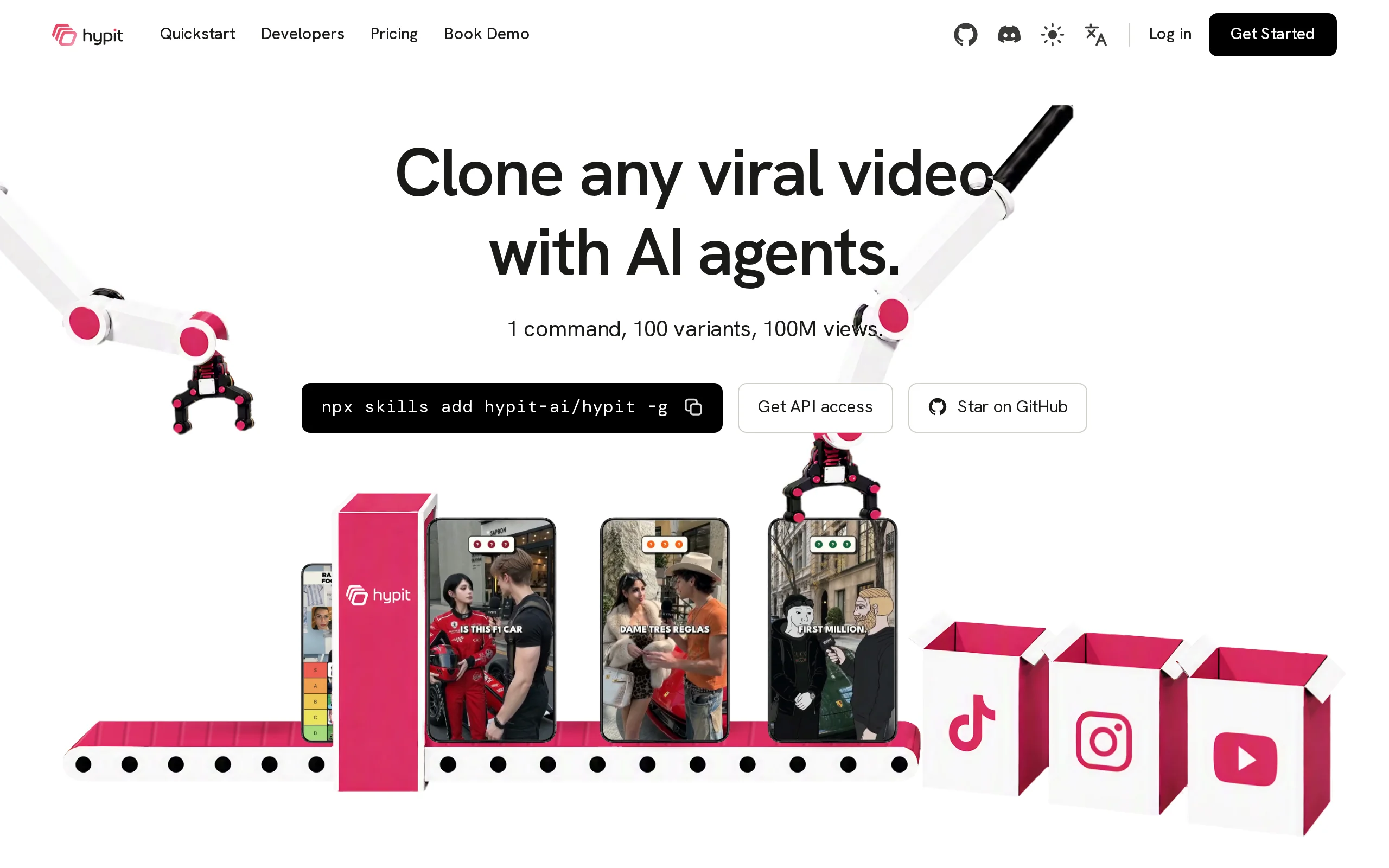
Hypit is an open-source AI video generation tool, centered on the methodology of "Provide an Agent with a viral video, and it will automatically replicate the entire workflow." It breaks down viral videos into structured .svml files, enabling text-driven editing capabilities where changing a single sentence automatically adjusts the audio, visuals, and subtitles in sync. The tool supports full video cloning, changing hosts, changing content, and changing languages. A single command can generate hundreds of video variants in bulk, and it can be directly invoked in coding Agents such as Claude Code, Codex, and Doupai, offering short video creators a complete automated workflow solution from cloning, editing to mass production.
Image source: Official article
Image source: official article
Technical positioning and domain: Belongs to the AI video generation and automated workflow domain, and is positioned as an open-source video workflow framework. Unlike traditional "text-to-video" tools, Hypit's core focus is on the structured decomposition and reconstruction of existing videos. It treats videos as programmable text objects (.svml), allowing Agents to perform deep video editing and bulk variant generation through text read/write operations, thus opening up a new path for video production automation.
Development background: Hypit was developed by the Hypit AI community using an open-source collaboration model, with the core design philosophy of "natively designed for Agents." The development team believes that most current AI video tools are designed around manual operations, while a significant amount of repetitive work in the video production pipeline (decomposition, alignment, variant generation) is best automated by Agents. Based on this insight, Hypit is built from the ground up with structured text and pluggable models at its core, establishing a complete video production pipeline tailored for Agents.
Core value: Hypit addresses three long-standing pain points in video production: the inefficiency of audio-visual synchronization and manual alignment (through a script anchoring mechanism), the difficulty of reusing the structure of viral videos (through full video cloning and .svml structured recombination), and the high cost of mass-producing video variants (through bulk variant generation and zero-cost rendering). This tool makes the cost of producing the "second video" nearly zero, naturally fitting scenarios for traffic投放 and product testing, as well as matrix account operations.
Technical features: Hypit uses script anchoring rather than timeline anchoring in its data model, binding all materials to the script. Changing a single line of dialogue automatically adjusts the voice, subtitles, and animations. The model layer is fully pluggable, with voice synthesis, video generation, image generation, and visual understanding all being replaceable modules. It is compatible with mainstream models such as Seedance, Keling, and MiniMax, and also supports pure code rendering to achieve zero-cost video output, providing a flexible and low-cost automated path for video production.
2. Key Features
Full Video Cloning: The Agent automatically dissects the shot structure, pacing, subtitles, and special effects of a reference video, reconstructing them into a reusable complete workflow. Users only need to provide a video path or link, and Hypit can deeply analyze the video's structure, material organization, and editing logic, generating equivalent structured project files to fully replicate viral videos.
Text-Driven Editing: The video is written as a structured .svml file. When users modify a line of dialogue, the voice, subtitles, and animations automatically synchronize. This mechanism fundamentally changes the traditional video editing model of "manually editing each track," transforming video editing into text editing, drastically reducing modification costs and iteration cycles, making "edit text, edit video" a reality.
Dialogue Anchoring Mechanism: All materials are bound to dialogue rather than the timeline. Deleting a segment of dialogue automatically removes the associated voice, subtitles, and animations. This design completely solves synchronization issues, avoiding common problems in traditional nonlinear editing such as audio-visual misalignment and track residue, and enables structural reorganization and content replacement with minimal error rates.
Bulk Variant Generation: Under the same video structure, users can一键replace the host's appearance, product content, or language type, generating 10/50/100+ differentiated videos with a single command. The framework reuse mechanism brings the cost of the second video close to zero, making it ideal for large-scale matrix account operations, ad testing, and multi-language overseas distribution, significantly reducing the unit production cost of videos.
Zero-Cost Rendering: When rendering visuals purely through code, no AI models are called, and the cost of a single video can be $0. For content types that do not require real image materials (such as rankings, MG animations, and data presentations), Hypit can directly render the final video through code. It only calls models and incurs costs when AI-generated visuals are needed, greatly reducing the marginal cost of bulk production.
Pluggable Model Architecture: Voice synthesis, video generation, image generation, and visual understanding are all independent and replaceable modules. Models such as Seedance, Keling, and MiniMax can be freely switched without locking in any single vendor. This open architecture allows users to freely adjust model combinations based on output quality, cost budget, and scenario requirements, avoiding dependency on specific suppliers.
Arbitrary Agent Invocation: By installing the Skill with a single command
npx skills add hypit-ai/hypit -g, Hypit can be directly invoked in any coding Agent such as Claude Code, Codex, or Doudian. Hypit packages the entire video production process into skill units that the Agent can understand, making conversational video production possible and significantly lowering the usage barrier.Multilingual Localization: A single video can be output in ten different language versions, with timing automatically realigned upon modifying a single line of text. Multilingual versions are not simply subtitle replacements, but are rebuilt based on the structured characteristics of .svml, producing natural and fluent localized content. This is ideal for cross-border e-commerce and overseas content teams.
Quick Start with Templates: Built-in templates for podcasts, street interviews, dialogues, and video calls are available, supporting pure text descriptions for Agent-driven creation from scratch. For scenarios without a reference video, users can directly describe their requirements in text, and the Agent will call models to generate materials and compile them into a complete video, covering both cloning and original creation paths.
3. How to Use
Environment Setup: Ensure that Node.js and pnpm are installed on your local machine. Hypit operates within the Node.js ecosystem and requires corresponding version support (recommended Node.js 18 or higher). After installation, you can verify the environment configuration by running
node -vandpnpm -v.Install Skill: Execute the command
npx skills add hypit-ai/hypit -gin the terminal to install the Hypit skill globally. This command retrieves the Hypit Skill definition file and writes it to the global configuration, allowing any compatible coding Agent to recognize and invoke Hypit's workflow.Launch Agent and Enter Project Directory: Start Claude Code, Codex, or any compatible coding Agent, then navigate to your video project directory. Hypit uses the current working directory as the root directory of the video project, with .svml files and media resources organized based on this directory structure.
Issue Instructions: Enter
/hypit Clone this video: /path/to/video.mp4to clone a reference video, or directly describe your requirements in natural language, such as/hypit Help me create a ranking video that places Hypit at the S level. The Agent will parse the instruction and automatically plan the subsequent execution steps.Configure API Key: The Agent will automatically check the environment variables and prompt you to enter the required model API keys (separate keys for modules such as speech synthesis, video generation, image generation, and visual understanding). It supports BYOK (Bring Your Own Key) mode, allowing users to freely choose the model provider they want to integrate with.
Generate Materials: The Agent calls the selected models to batch generate various materials required for the video, such as A-roll footage, B-roll supplementary content, and character portraits. Users can adjust the style and content orientation of the materials through conversational instructions.
Compile and Render: The Agent organizes the materials and writes them into the .svml file, then invokes the rendering pipeline to synthesize the final video using 64 headless Chromium processes in parallel. The rendering process does not require a graphical interface and is entirely driven by the Agent.
Preview and Edit: Open the Studio workspace, with the source code editable on the left and real-time rendering preview on the right. Users can directly modify the text content in the .svml file, and the corresponding speech, subtitles, and animations in the video will automatically update, achieving a WYSIWYG experience.
Batch Output: After confirming the results, use a command to instruct the Agent to switch hosts, switch content, or switch languages and re-run the same workflow in bulk. This allows the production of hundreds of differentiated variants in one go, meeting the scalability needs of matrix account operations and ad campaign product testing.
4. Pros and Cons Analysis
| Pros |
|---|
| Dialogue Anchored Architecture: All materials are bound to dialogue rather than a timeline. Changing a single line of text automatically synchronizes voice, subtitles, and animations, completely solving the industry pain points of audio-visual desynchronization and manual alignment. |
| Agent-Native Design: .svml is purely structured text, and reading/writing text is exactly what agents excel at. There is no need for cumbersome preprocessing steps such as frame extraction, subtitle conversion, or visual recognition. |
| High Efficiency in Bulk Variations: By switching hosts, products, or languages within the same workflow, Hypit can generate over 100 variations in bulk. The cost of the second video approaches zero, making it naturally suitable for scenarios like traffic testing and matrix account operations. |
| Zero-Cost Video Production Baseline: Pure code rendering allows for the production of videos without invoking any models, resulting in a cost of $0 per video. Payment is only required when AI materials are needed, offering a flexible and controllable cost structure. |
5. Comparative Analysis with Similar Tools
| Comparison Dimension | Hypit | MoneyPrinterTurbo | Domo AI |
|---|---|---|---|
| Core Positioning | Open-source video workflow framework, cloning the complete structure of viral videos and mass-producing replicas | All-in-one AI short video generation tool, automatically generating videos from keyword inputs | AI video stylization and generation tool, supporting multiple artistic style transformations |
| Production Process | Agent planning → generate materials → write .svml → parallel rendering | LLM writes script → search/generate materials → TTS → subtitles → FFmpeg compositing | Upload video → select style model → transform/generate new video |
| Editing Method | .svml text file, dialogue anchoring, changing text directly alters the video | Streamlit WebUI form operations + API/CLI, re-generate by changing parameters | Web/App-based operations, parameterized control of style intensity |
| Material Strategy | AI-generated exclusive visuals, video/image/voice models are pluggable, supports pure code rendering | Pexels/Pixabay/Coverr stock materials + Seedance, MiniMax text-to-video sources | Based on user-uploaded videos, AI models re-draw with stylization |
| Agent Support | Native design, Skill one-click installation, supports conversational operations with any Agent such as Claude Code/Codex | v1.3.2 introduced Agent Skill, but the main interface remains WebUI/API/CLI | No native Agent interface, relies on official UI operations |
| Batch Variants | Switch hosts/languages/products to generate over 100 variants with one click, second video cost approaches zero | CLI batch list mode, but the visual structure remains largely unchanged | Does not support structured batch variant generation |
| Open Source License | Open source (MIT), forkable and self-deployable | Open source (MIT), active community | Closed-source commercial product |
| Community Ecosystem | Emerging project, community size is growing, templates and plugins are continuously expanding | Large community, comprehensive documentation, abundant third-party tutorials | Large user base, but closed ecosystem |
Selection Recommendations: For teams focused on traffic testing, product evaluation, matrix account operations, and multi-language international expansion, Hypit's structured cloning and batch variant generation capabilities are the most suitable. Although there is an initial investment in learning and setting up the environment, the marginal production cost per video approaches zero afterward, providing clear cost advantages for long-term, large-scale operations. For content creators who prioritize quick onboarding and focus on individual video production, MoneyPrinterTurbo's WebUI operations are more intuitive, and its hybrid model of stock materials helps avoid the unpredictability of AI-generated visuals. If the primary need is for detailed manual editing and stylized post-production, CapCut and Domo AI are more aligned with traditional creative workflows, though neither supports structured batch production.
6. Editor's Summary
Hypit has chosen a highly differentiated technical approach in the video generation tool space. Unlike mainstream "text-to-video" tools, Hypit focuses on the structured decomposition and reconstruction of videos. By utilizing the .svml textual video format, it transforms video content into objects that can be read and written by Agents, thereby evolving video editing from graphical interface track operations to precise text-level modifications. This architectural innovation enables the "script line anchoring" mechanism—where all materials and dialogue are bound to script lines rather than the timeline. Deleting or modifying dialogue automatically adjusts the voice, subtitles, and animations, fundamentally solving the issue of audio-visual synchronization in traditional workflows.
In terms of practical value, Hypit holds significant importance for matrix account operation teams and advertising campaign teams. In traditional models, each video for a matrix account requires going through the complete process of topic selection, scripting, filming, and editing. Hypit compresses this process into "one-time setup, hundred-times reuse," allowing the same workflow to generate hundreds of differentiated variants in bulk. The marginal cost for subsequent videos approaches zero, and combined with the zero-cost code rendering option, it greatly reduces the financial barriers to large-scale content production.
Hypit's open architecture is also worth noting. The model layer is fully pluggable, with modules for speech synthesis, video generation, and image generation all replaceable. Users can flexibly combine these components with their own API keys, without being locked into any single vendor. Combined with its open-source attributes that allow forking and self-deployment, the tool automatically upgrades as upstream model capabilities evolve. In terms of target users, Hypit is aimed at creators and operation teams with a certain level of technical proficiency—those who are familiar with the basic usage of coding Agents and are willing to invest a small amount of time to complete environment setup can achieve long-term efficiency gains. At this stage, the project's ecosystem is still in its growth phase, with a limited number of templates and community cases. However, its architectural direction aligns closely with the industry trend of Agent-based production, and it has significant potential for continuous development.
7. Application Scenarios
Paid Advertising Campaigns and Creative Testing: Advertisers can clone high-performing creatives from Meta Ad Library using Hypit, quickly replacing products, hooks, and opening scenes. They can generate 50 differentiated opening variants in a single day for campaign testing. Once the creative becomes fatigued, only the opening part needs to be rerun to refresh the content, significantly reducing the testing cycle and creative production costs.
TikTok Shop / Affiliate Marketing Short Videos: Marketing teams can use a fixed, high-conversion video structure that has been validated. By replacing SKU, price, and CTA voice-over content daily, they can mass-produce short videos needed for new product launches. This maintains account update frequency and content consistency without needing to re-conceive scripts or reshoot content.
Podcast and Interview Clip Distribution: Podcast hosts can import full interview videos into Hypit, where the Agent automatically splits the video into clips and completes tasks such as multi-screen layout, speaker subtitles, and reaction stickers. It can generate clips suitable for different platforms like Douyin, Bilibili, and YouTube Shorts, maximizing the efficiency of distributing one live stream across multiple platforms.
Content Matrix and Multilingual Global Operations: Operations teams can use the same workflow as a base, replacing different host avatars and generating versions in ten languages. This allows for the mass creation of multi-platform content matrices. Voice, subtitles, and visual timing for each video are automatically realigned based on .svml, eliminating the need for manual production per language, making it ideal for cross-border e-commerce and global content teams aiming for scalable localized distribution.
Article / WeChat Official Account Content to Video: Self-media creators can input article or WeChat Official Account content into Hypit, where the Agent automatically matches animations, subtitles, and B-roll footage to generate a voice-over video. This enables synchronized distribution of text-based and video content. No basic editing skills are required—after publishing an article, a matching video can be created effortlessly, broadening content reach channels.
8. FAQ
Q: What is the fundamental difference between Hypit and traditional AI text-to-video tools?
A: Traditional text-to-video tools (such as Runway, Pika) generate video frames directly from text, while Hypit's core is the cloning and reuse of video workflows. It breaks down existing viral videos into structured .svml files, allowing users to modify the text content to adjust the video's audio, visuals, and subtitles, and then generate variations in bulk based on that. The former is suitable for creative generation of individual videos, while the latter is ideal for large-scale, structured video production.
Q: Does using Hypit require programming skills?
A: Basic usage requires familiarity with command-line operations and the fundamental calling methods of the Agent, but does not require writing complex code. Users can complete cloning, editing, and batch video generation by issuing instructions to the Agent in natural language. The main technical barrier lies in configuring the Node.js environment and installing Skills, which can be successfully completed by referring to the official documentation.
Q: What is an .svml file, and why is this format used?
A: .svml (Structured Video Markup Language) is a structured video description format defined by Hypit, which records all the arrangement information of a video in text form, including shots, dialogue, subtitles, animations, and material references. The core reason for choosing a text format is that the Agent's ability to read and write text is far superior to its ability to process video frames. This allows the Agent to directly perform video decomposition, editing, and reassembly without requiring preprocessing steps such as visual recognition or frame extraction.
Q: Which video generation and voice synthesis models does Hypit support?
A: Hypit's model layer uses a pluggable architecture, where voice synthesis, video generation, image generation, and visual understanding are all independent modules. Mainstream domestic models such as Seedance, Keling, and MiniMax can be integrated. Users can use BYOK (Bring Your Own Key) to access these models, allowing flexible switching of model combinations across different projects without being locked to any specific vendor.
Q: How different are the video variations produced in bulk?
A: The degree of difference between variations depends on the parameters being replaced. Replacing the host, language, or product will result in noticeable differences in visuals and narration, while replacing only CTA or price information maintains a stable structure. Users can freely combine replacement dimensions according to their testing needs, ranging from "minor variations of the same structure" to "fully different variations with new hosts and languages."
Q: Does zero-cost video rendering with pure code mean that AI is not used at all throughout the process?
A: Pure code-rendered videos (such as ranking lists, MG animations, and data presentations) can be generated entirely without calling AI models, as the visuals are created directly by the code, resulting in zero cost. However, scenarios requiring AI-generated realistic footage, voice, or images still require calling the corresponding models, with costs incurred based on actual usage. Users can flexibly choose between full code, full AI, or hybrid modes depending on the content type.
9. Project Links
- Project Website: https://hypit.ai/
- GitHub Repository: https://github.com/hypit-ai/hypit
Related AI Model Articles

Review of DeepSeek Harness Desktop: How the Official GUI Client Lowers the Bar for Agent Usage
DeepSeek Harness Desktop is the official graphical client launched by DeepSeek, designed to provide a visual interface for the originally command-line-based DeepSeek Harness framework. After users log...

Step Code – In-Depth Review of StepFun's Open-Source Terminal Programming Agent
Step Code is an open-source terminal programming agent launched by StepFun, licensed under the MIT License, which allows developers to complete the full workflow of code writing, debugging, execution,...
In-Depth Review of Claude Opus 5.5: A Revolution in Programming Efficiency and Safety for Anthropic's Flagship Model
Claude Opus 5.5 is the first flagship model in Anthropic's Claude 5.5 series, launched in June 2026. It is positioned as a high-end AI model designed for enterprise-level agent programming, complex kn...
In-Depth Review of GPT-6 Sol: A Cost-Effective Revolution in OpenAI's Mid-to-High-End Large Model
GPT-6 Sol is a mid-to-high-end large model introduced by OpenAI, derived from the GPT-6 Astra base model. It brings Astra's reasoning, programming, factual accuracy, and Agent capabilities down to a m...
© All Rights Reserved. Some content on this site is partially generated by AI with human review.