
Alibaba Cloud Bailian CLI – Alibaba Cloud's Open-Source AI Agent Command-Line Tool
Executive Summary:
Alibaba Cloud Bailian CLI is an open-source AI Agent command-line tool from Alibaba Cloud, designed specifically for agent scenarios. With a single command, developers can let an Agent automatically i...
1. What Is Alibaba Cloud Bailian CLI
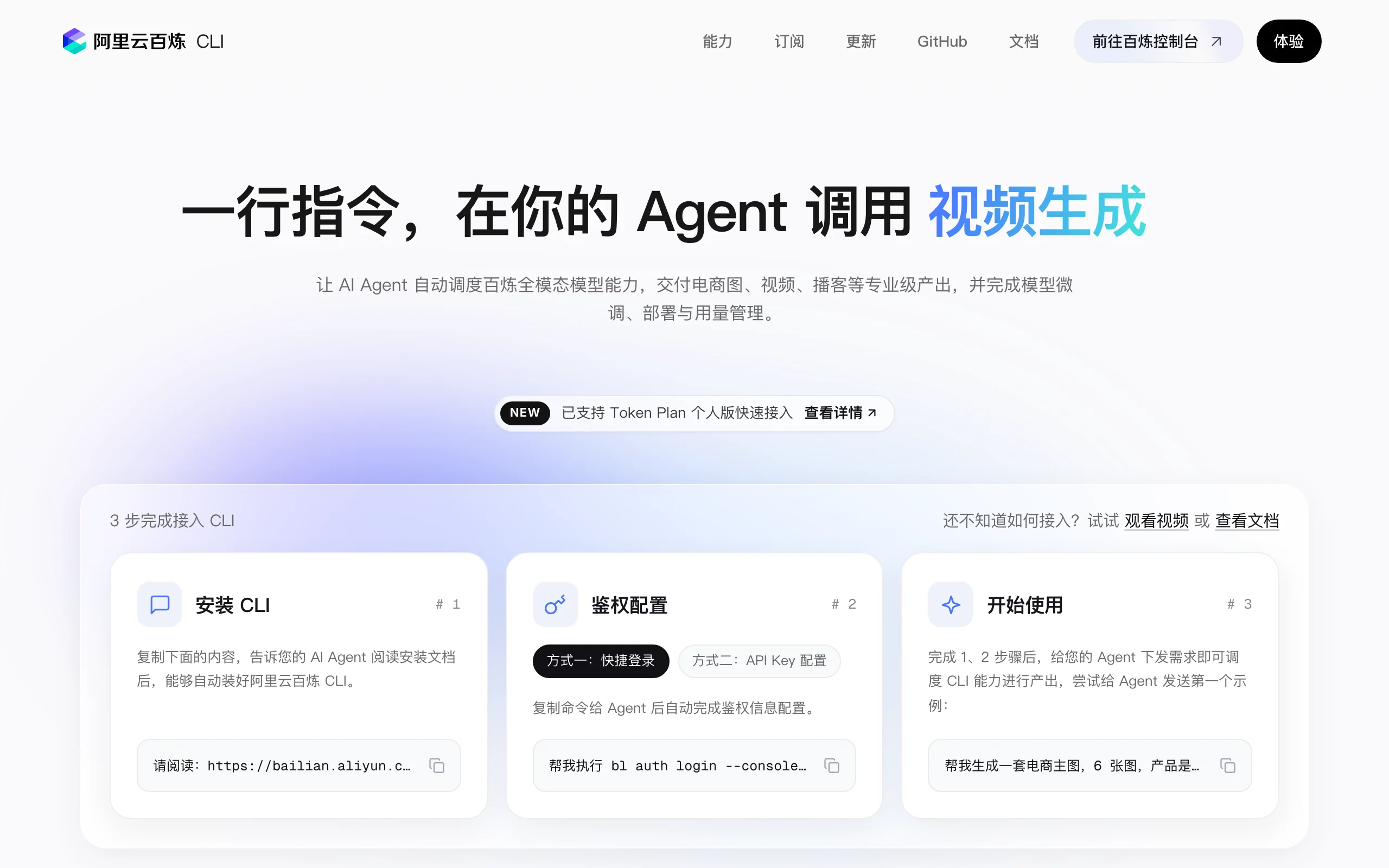
Alibaba Cloud Bailian CLI is an open-source AI Agent command-line tool from Alibaba Cloud, designed specifically for agent scenarios. With a single command, developers can let an Agent automatically invoke 150+ multimodal models, 10+ applications, knowledge bases, memory, web search, and the full suite of capabilities on the Alibaba Cloud Bailian platform. The tool is natively compatible with mainstream Agent frameworks such as Claude Code, Qoder, and OpenClaw. It supports full-modality task invocation and structured output across text, image, video, and speech, enabling complete workflows from single-model calls to multi-capability orchestration.
Image source: Official article
Technical positioning and domain: Alibaba Cloud Bailian CLI belongs to the cloud-native AI development tools space. It is positioned as the command-line entry point for cloud AI capabilities and an Agent orchestration layer. It is not a traditional model inference engine in the usual sense, but rather a "capability aggregator" for agent application developers—exposing models, applications, and data services on the Bailian platform through a unified CLI interface to Agent frameworks, greatly reducing the complexity of multimodal, multi-capability collaboration.
Development background: The tool was developed by the Alibaba Cloud Bailian team, leveraging Alibaba Cloud's expertise in large-model-as-a-service (MaaS). As Agent frameworks such as Claude Code and Qoder gained traction, developers needed a standardized way to integrate cloud platform capabilities into Agents. Alibaba Cloud Bailian CLI was created to address pain points in traditional API usage: complex multi-model switching, difficult capability orchestration, and cumbersome authentication flows.
Core value: The core value lies in "minimal integration" and "full-modality coverage." Developers do not need to manually configure multiple APIs, manage keys, or write complex invocation logic—a single command gives the Agent access to the full Bailian capability set. This dramatically lowers the barrier to building multimodal AI applications, especially for rapid prototyping or complex workflow construction.
Technical characteristics: The tool uses an "instruction-driven + automatic authentication" architecture. Agents trigger model calls, knowledge base retrieval, and memory read/write through natural-language instructions. It also provides structured results (JSON Schema) for easy parsing and chained invocation, enabling automated orchestration from single capabilities to end-to-end tasks.
2. Key Features
Full-modality model invocation: One-click access to 150+ models on the Bailian platform, covering text generation (e.g., Qwen3.7-Max), visual understanding (Qwen3-VL-Plus), speech synthesis (CosyVoice V3 Flash), image generation (HappyHorse 1.0), and video generation. Developers need not distinguish model types—unified CLI parameters let the Agent handle routing and result parsing automatically.
Enterprise-grade data and application services: Knowledge base retrieval (RAG), persistent memory storage, workflow invocation, and agent invocation. Agents can query enterprise knowledge bases in real time during conversations, maintain cross-session context memory, or trigger predefined workflow templates for automated business logic.
Built-in Agent tool capabilities: The tool layer includes web search (real-time information retrieval), temporary file upload (48-hour valid URLs for image/video input), quota monitoring, and automatic API documentation integration. Agents can call these tools directly without additional development.
Native compatibility with mainstream Agent frameworks: Specifically adapted for Claude Code, Qoder, Qwen Code, OpenClaw, Hermes Agent, and other leading frameworks. Add one command in the Agent configuration file to register Bailian CLI as a tool for plug-and-play integration.
Complex capability orchestration: Combine model calls, application services, knowledge retrieval, memory, web search, and file processing into complete task flows. For example: read a local image → invoke visual understanding → retrieve background from knowledge base → generate new assets with image generation → produce narration via speech synthesis.
Structured output and chained invocation: All API responses use standard JSON Schema with type markers, metadata, and error codes. Agents can parse results automatically and decide next steps, enabling multi-step automated chains with less manual intervention.
3. How to Use
Environment requirements: Any OS supporting Python 3.8+ (Linux, macOS, Windows). Network access to Alibaba Cloud Bailian services is recommended. No GPU or high-performance compute is required—the CLI is a lightweight client; all inference runs in the cloud.
Install the CLI: In your Agent tool, run the install script:
curl -fsSL https://bailian.aliyun.com/cli/install.sh | bashOr manually download the binary and add it to your system PATH. After installation, run
bailian --versionto verify.Obtain an API Key: Log in to the Alibaba Cloud Bailian console (https://bailian.console.aliyun.com), create a personal key on the API Key management page. Store keys securely; environment variables are recommended.
Complete authentication: Provide the API Key to your Agent for automatic auth configuration. In Claude Code, for example:
export BAILIAN_API_KEY="your-api-key"
bailian auth
After successful authentication, the CLI binds your account and displays available models.
Start using: Enter natural-language instructions in your Agent, such as "Generate an e-commerce hero image in Nordic minimalist style, 800x800." The Agent will invoke Bailian CLI's image generation model and return results. For complex tasks, chain multi-step instructions, e.g., "Read the local product image, extract features with visual understanding, then generate 3 marketing images with different backgrounds."
Best practices: Wrap frequently used capabilities as Agent "skills" or tools and persist them in configuration. Register
bailianas a tool in Claude Code's.claude/settings.jsonfor direct reference in later conversations. Monitor API quotas to avoid exceeding free tiers.
4. Pros and Cons
| Pros |
|---|
| Minimal integration: One command gives Agents full Bailian capabilities without manually configuring multiple API endpoints or complex invocation logic, greatly lowering development barriers. |
| Full-modality coverage: Unified access to 150+ models across text, image, video, speech, and visual understanding, meeting diverse Agent needs without multi-platform switching. |
| Native Agent adaptation: Designed for Agent scenarios with native Claude Code and Qoder compatibility—plug and play without extra adaptation. |
| Complex capability orchestration: Combines models, knowledge bases, memory, and web search into automated task flows from single calls to end-to-end delivery. |
5. Comparison with Similar Tools
| Dimension | Alibaba Cloud Bailian CLI | Claude Code | Qoder |
|---|---|---|---|
| Product positioning | Cloud AI capability CLI entry, designed for Agents calling Bailian multimodal services | Terminal AI coding assistant for daily development and engineering tasks | Fully managed AI Agent platform with code writing and file operations |
| Core capabilities | 150+ multimodal models, knowledge retrieval, memory, web search, image/video/speech generation and editing, workflow orchestration | Code refactoring, file editing, terminal commands, Git, codebase understanding, test execution | Code writing, command execution, file management, Git, multi-file collaboration |
| Model support | Qwen3.7-Max, Qwen3-VL-Plus, CosyVoice V3 Flash, HappyHorse 1.0, and 150+ Bailian models | Anthropic Claude series only (Claude 3.5/4/Opus 4.8) | Multiple models via API; Qwen series by default |
| Usage | One-command install and auth; natural-language instructions for automatic cloud capability invocation | Interactive terminal dialogue; direct local codebase and dev environment access | Cloud-hosted Agent; tasks via Web or CLI |
| Modality coverage | Full modality: text, image, video, speech, visual understanding, audio-video interaction | Primarily text; image upload analysis; no video/speech generation | Primarily text and code; limited image analysis |
| Open-source license | Open source (see repository; typically Apache 2.0) | Partially open source (core Claude Code features) | Open source (MIT) |
| Use cases | E-commerce marketing assets, multimodal content production, enterprise intelligent customer service, complex AI workflow orchestration | Software development, code review, bug fixes, legacy code maintenance | Fully managed AI programming assistant for rapid development and deployment |
Selection advice: If your core need is rapidly integrating multimodal capabilities (image generation, speech synthesis, video editing) into Agent workflows, Alibaba Cloud Bailian CLI is the best choice for its rich model library and one-stop orchestration. For code-centric work, Claude Code and Qoder excel at programming tasks; use Bailian CLI as a supplementary tool for multimodal needs. For highly customized Agent frameworks, OpenClaw offers more flexible tool registration but requires self-configured model access.
6. Editor's Take
Alibaba Cloud Bailian CLI deserves recognition for technical innovation: it is not a simple API wrapper but an architecture designed for Agents—"instruction-driven + structured output + automatic authentication"—so Agents invoke complex cloud capabilities via natural language. This draws on MCP (Model Context Protocol) ideas but emphasizes deep Alibaba Cloud ecosystem integration. In practical value, it significantly lowers multimodal AI development barriers—what once took days (model selection, API integration, auth, result parsing) now takes one command. Efficiency gains are especially clear in e-commerce marketing, content production, and intelligent customer service where models are switched frequently.
The primary audience is AI Agent developers, full-stack engineers, and product managers validating multimodal AI quickly. Pure algorithm researchers may find less value since underlying models are not customizable. Future potential is strong: as Bailian adds models and services, the CLI may become a "super entry" for Alibaba Cloud AI capabilities, possibly a core component of Agent operating systems. Community ecosystem is still early; documentation and examples need enrichment. —deductions for strong cloud dependency and network latency, but strengths outweigh weaknesses.
7. Application Scenarios
E-commerce marketing automation: Agents read local product images and invoke Bailian CLI image generation and editing models to output multi-angle hero images, white-background shots, and scene images. Fully automated batch processing reduces design costs.
Multimodal content production: Natural-language instructions (e.g., "Generate a 3-minute short video about space exploration") trigger orchestrated text (script), image (storyboard), video (composition), and speech (voiceover) for professional delivery. Suitable for self-media, education, and advertising.
Enterprise intelligent customer service: Combine knowledge base retrieval, cross-session memory, and web search for business-context-aware assistants. Agents query internal knowledge bases, persist user preferences via memory, and search the web when needed for accurate answers.
Complex workflow orchestration: Combine models, applications, knowledge bases, memory, and file processing into automated flows. Example: upload contract image → OCR extraction → knowledge base clause retrieval → text generation summary → speech synthesis for audio briefing. Suitable for legal, audit, and finance.
8. FAQ
Q: Does Alibaba Cloud Bailian CLI support offline use?
A: No. All inference and data services run on Bailian in the cloud; the CLI is only a client. For offline needs, consider Bailian dedicated deployment options; the CLI itself does not provide offline capability.
Q: Install shows "curl: command not found"—what should I do?
A: Install curl (usually preinstalled on Linux/macOS; Windows may need manual install or PowerShell's Invoke-WebRequest). Alternatively download the script from https://bailian.aliyun.com/cli/install.sh or get binaries from the GitHub repository.
Q: How do I view available models?
A: After authentication, run bailian models list to see callable models and IDs. Some models may require additional permissions—see the "Model Management" page in the Bailian console.
Q: How do I securely pass API Keys to Agents?
A: Use environment variables, e.g., export BAILIAN_API_KEY="your-key" before starting the Agent. Avoid typing keys in conversation or hardcoding them in config files. In Claude Code, set via the env field in .claude/settings.json.
Q: How do I retrieve generated images or videos?
A: CLI results include file URLs (48-hour validity). Agents can download or use URLs for downstream processing. For persistent storage, use Alibaba Cloud OSS or other object storage.
Q: Does it support custom model deployment?
A: The CLI cannot directly call user self-deployed models. It only invokes official Bailian platform models. To use custom models, deploy via the Bailian console first, then call the deployment API endpoint through the CLI.
9. Project Links
- Official site and install guide: https://bailian.console.aliyun.com/cli
- GitHub repository (source and documentation): https://github.com/aliyun/bailian-cli
- Alibaba Cloud Bailian console (API Key): https://bailian.console.aliyun.com
Related AI Model Articles

Review of DeepSeek Harness Desktop: How the Official GUI Client Lowers the Bar for Agent Usage
DeepSeek Harness Desktop is the official graphical client launched by DeepSeek, designed to provide a visual interface for the originally command-line-based DeepSeek Harness framework. After users log...

Step Code – In-Depth Review of StepFun's Open-Source Terminal Programming Agent
Step Code is an open-source terminal programming agent launched by StepFun, licensed under the MIT License, which allows developers to complete the full workflow of code writing, debugging, execution,...
In-Depth Review of Claude Opus 5.5: A Revolution in Programming Efficiency and Safety for Anthropic's Flagship Model
Claude Opus 5.5 is the first flagship model in Anthropic's Claude 5.5 series, launched in June 2026. It is positioned as a high-end AI model designed for enterprise-level agent programming, complex kn...
In-Depth Review of GPT-6 Sol: A Cost-Effective Revolution in OpenAI's Mid-to-High-End Large Model
GPT-6 Sol is a mid-to-high-end large model introduced by OpenAI, derived from the GPT-6 Astra base model. It brings Astra's reasoning, programming, factual accuracy, and Agent capabilities down to a m...
© All Rights Reserved. Some content on this site is partially generated by AI with human review.